Discover how to automate review requests for business growth.
- Navigate to your Reputation tab, if you don't have this tab, reach out for an account upgrade.
- In the dropdown, select ReviewRequests.
- Below you should see a list of various settings we'll setup.
- Step 1 is where we will enable our automatic reviews, check off the following boxes.
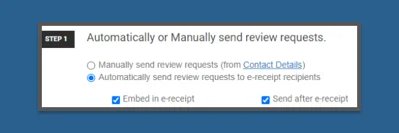
- Now that we have that enabled you can scroll through, preview your receipt and set up your company spokesperson. This will go off your user profile.
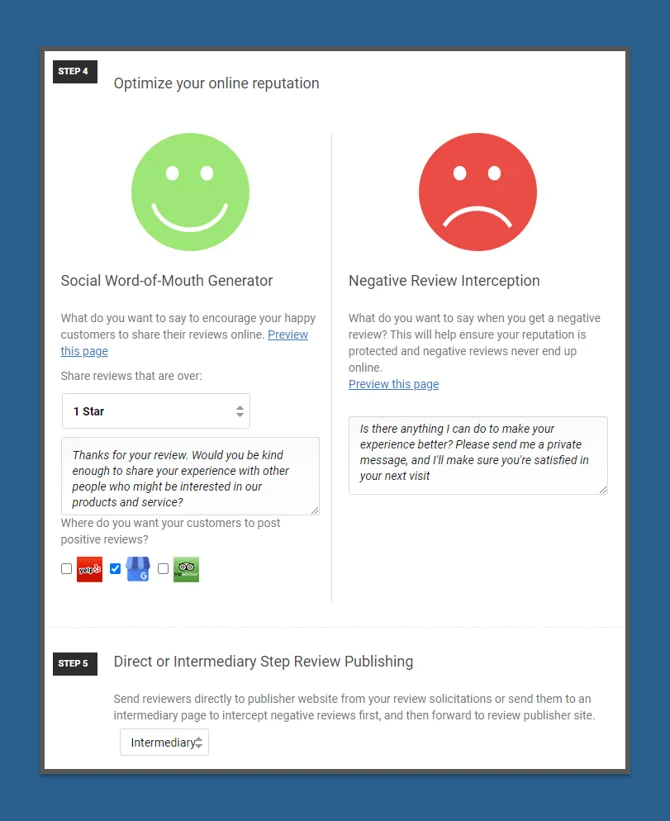
- Step 4 will allow you to setup your interceptor settings, if you are unaware of how this works it will essentially request a review and send the review back to you if it is below a certain rating in order to be reviewed before it is published publicly.
- Step 5 enables the intermediary, the direct option will direct customer right to your google business review link.
Next Step: Learn how to connect your Google Business!
Was this article helpful?
That’s Great!
Thank you for your feedback
Sorry! We couldn't be helpful
Thank you for your feedback
Feedback sent
We appreciate your effort and will try to fix the article