Adding Deals to Your Website
Adding deals to your website is a great way to showcase promotions, attract more customers, and increase engagement directly through your Springboard Domain site. This guide will walk you through enabling and creating deals.
Before You Begin
Make sure that the Deals feature is enabled on your Springboard Domain website.
To check:
Go to Settings
Select Software Setup
Click Messaging and Domain Tools
Open Springboard Domain
Scroll down to Step 5
Toggle Deals to ON
Once enabled, you can start adding deals to your website.
Note: If your Springboard Domain has not been set up yet, you may follow this guide:
https://puncheyteam.freshdesk.com/en/support/solutions/articles/158000405824-how-to-configure-your-smart-domain
How to Add a Deal
Navigate to Conversations > Deals

Click + New Deal
Fill in the details:
Title
Discounted Price
Normal Price
Start and End Date (optional)
Quantity (optional)
Subtitle
Deals Description
Deals Logo (must be 500 pixels wide)
Terms and Conditions (if applicable)
Click Save
Authorizing the Deal
After saving, the deal will be created as a draft.
Review all the information carefully
Once everything is correct, click Authorize Deal
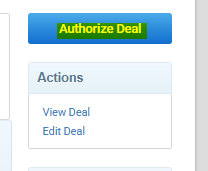
Your deal will then be published.
How to End a Deal
You may end a deal at any time:
Go to Conversations > Deals
Select the deal you want to end
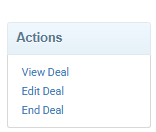
Click End Deal
Where to View Your Deal
Authorized deals will be visible on your Springboard Domain website, allowing customers to browse and take advantage of your offers.
Why This Matters
Adding deals to your website helps you highlight special offers in a structured and professional way. It makes it easier for customers to discover promotions, encourages faster purchasing decisions, and keeps your website content dynamic and engaging. Regularly updating deals can also improve customer retention and drive repeat visits.
Was this article helpful?
That’s Great!
Thank you for your feedback
Sorry! We couldn't be helpful
Thank you for your feedback
Feedback sent
We appreciate your effort and will try to fix the article