Quick compare
See all four ways to create an appointment → [Overview Article]
Steps – Customer Profile
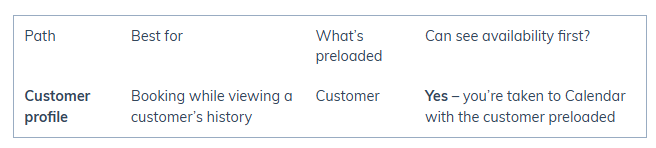
Best for: Booking while reviewing a customer’s details, history, or assets.
Open the customer’s profile in Customers.
Click New appointment (or Book appointment, depending on your system version).
You’ll be taken to Calendars with the customer preloaded.
Click a time slot to open the Appointment form.
Complete the Appointment form and click Book appointment.
Appointment Form Fields (common to all paths)
Customer: Search/select the customer. Their assets (if applicable) will appear.
Date & time: Confirm or adjust.
Resource (staff): Select who is performing the service.
Service(s): Select one or more services. (Pricing can be adjusted later at checkout.)
Tags & color (optional): Add tags or assign a color code.
Reminder window: Set SMS reminders via your Smart Number.
Asset (if used): Assign the asset.
Recurring (optional): Check Recurring and configure repeat pattern.
Deposit (optional): Use the dropdown on Book appointment to collect a deposit.
Book: Click Book appointment to finish.
This section is shared across all four methods. See the Overview Article for details and links to other booking methods.
Pros & Considerations
Pros:
Ensures the correct customer is booked.
Easy to confirm past activity and context before scheduling.
Consider:
One extra step if you already know the time and resource.
Troubleshooting
If the customer record is missing, create it before booking.
If you don’t see the New appointment button, check your permissions or role settings.
Was this article helpful?
That’s Great!
Thank you for your feedback
Sorry! We couldn't be helpful
Thank you for your feedback
Feedback sent
We appreciate your effort and will try to fix the article