Overview
If you are unable to access your user account because you forgot your password, there are simple ways to reset it and regain access quickly. You can either reset your password directly from the login page or contact the Support Team for assistance.
There are two ways to reset your password:
Reset your password using the Forgot Password option on the login page
Contact the Support Team to request a temporary password
Why Password Recovery Matters
Having access to a secure password recovery process helps:
Protect your user account from unauthorized access
Ensure only authorized users can request password changes
Minimize downtime when you are locked out of your account
Keep your account information secure and accessible
For security purposes, only the authorized user associated with the email address on file or the account administrator can request a password reset.
Option 1: Reset Your Password Through the Login Page
Select Forgot Password.
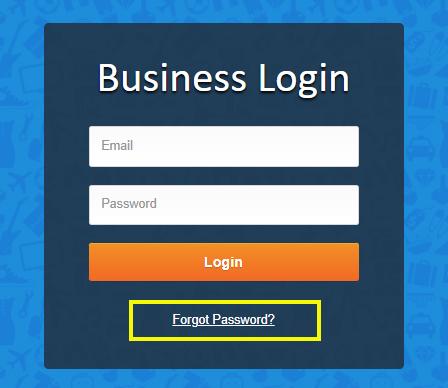
Enter your email address associated with your user account.
Follow the password reset instructions sent to your email.
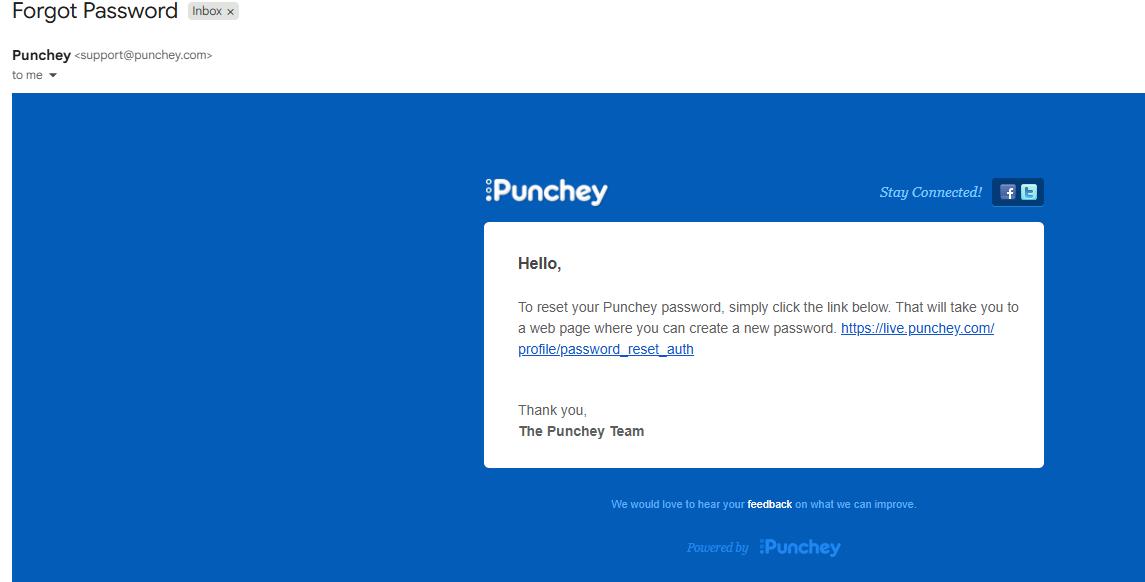
Once completed, you can log in using your newly created password.
Option 2: Contact Support for Assistance
If you are unable to reset your password through the login page, you may contact the Support Team for assistance.
Reach out to the Support Team here: https://support.punchey.com/support/solutions/articles/158000405658-how-to-reach-support
Request a temporary password for your user account.
Please note:
Only the authorized user using the email address on file or the account administrator can request a password change.
The Support Team may verify account information before providing a temporary password for security purposes.
Was this article helpful?
That’s Great!
Thank you for your feedback
Sorry! We couldn't be helpful
Thank you for your feedback
Feedback sent
We appreciate your effort and will try to fix the article