Overview
Punchey allows you to process partial or split payments on a single invoice using multiple payment methods. This is helpful when a customer wants to pay with more than one option, such as part cash and part card, multiple cards, a gift card, or another payment method.
After the first partial payment is accepted, you can immediately continue collecting the remaining balance by selecting Make Another Payment.
Why Is This Important?
Split payments give customers more flexibility at checkout and help your business accurately track multiple payments on one invoice.
This feature can help you:
Accept more than one payment method on the same invoice
Process partial payments for customers
Combine cash, card, gift card, or other payment types
Keep payment records organized under one invoice
Ensure the full balance is collected accurately
Processing a Partial or Split Payment
Follow these steps to process a split payment:
Navigate to the Invoice section
Select the invoice you want to process payment for
Select Accept Payment
Choose the first payment method
Example: CashEnter the partial amount the customer is paying
Complete the first payment
After the payment is accepted, select Make Another Payment
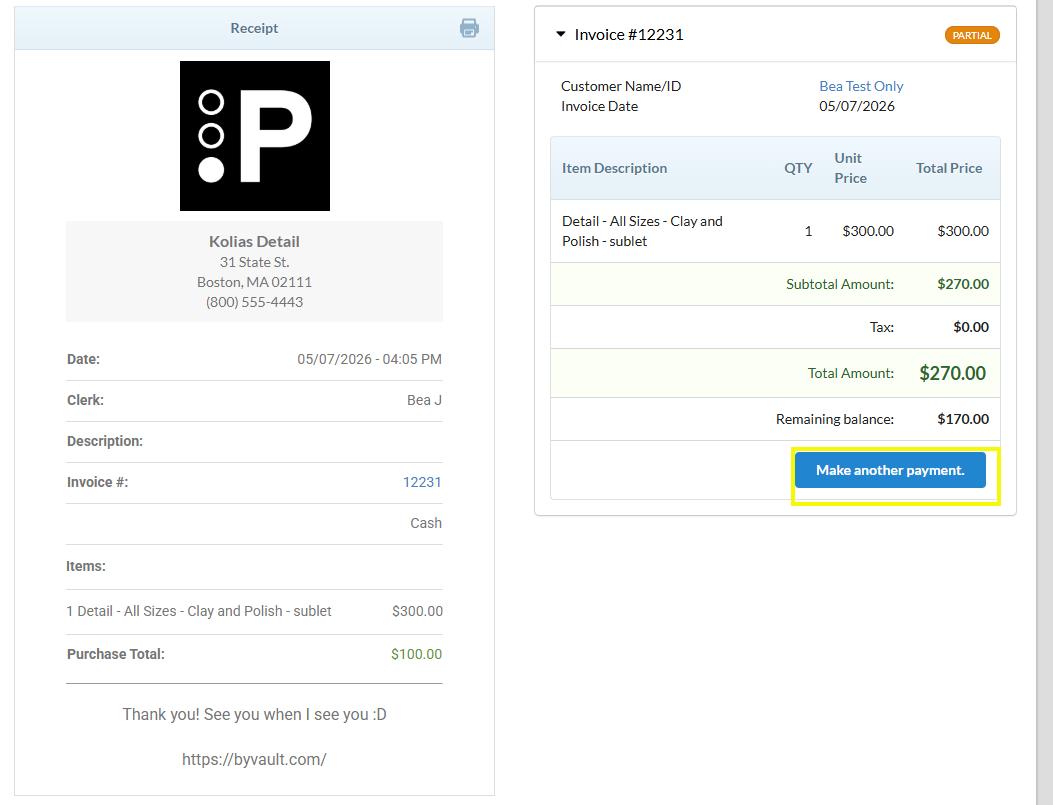
You will be directed back to the payment page
Select the next payment method
Example: Card, Gift Card, or another available payment methodEnter the remaining balance, or the next partial amount
Complete the payment
Repeat the process as needed until the invoice is fully paid
Notes
The invoice will automatically update to reflect each payment made
You can use different payment methods on the same invoice
Always confirm that the total amount received matches the full invoice total
Was this article helpful?
That’s Great!
Thank you for your feedback
Sorry! We couldn't be helpful
Thank you for your feedback
Feedback sent
We appreciate your effort and will try to fix the article